
Type
Improvement
New Features
Inactivate multiple discounts at once, hide old discounts from History, and unhide them when you need to see them again.
Where
Discount Engine — Active and History tabs.
Who it is for
Users who manage discounts and have access to the Discount Engine.
What changed
You can now select multiple discounts and update them together:
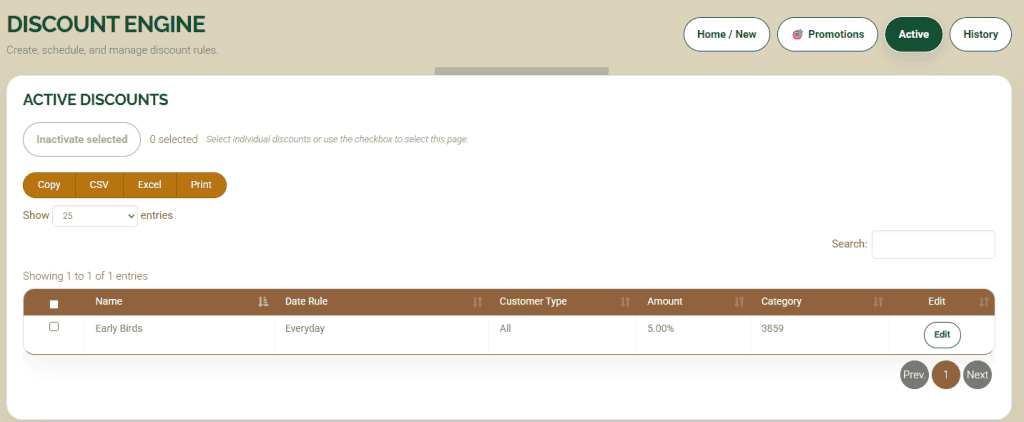
- Inactivate selected: Stop selected active discounts from running and move them to History.
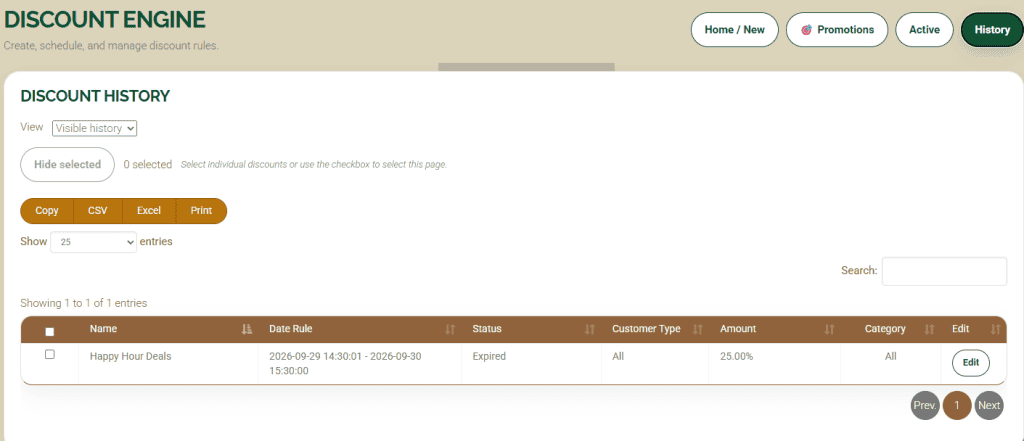
- Hide selected: Move selected inactive or expired discounts out of Visible history and into Hidden history.
- Unhide selected: Return selected hidden discounts to Visible history.
Only discounts that are already inactive or expired in History can be hidden. Hiding and unhiding change their visibility without changing their status, dates, or discount rules. Unhiding a discount does not reactivate it.
Active discounts can be bulk flipped to inactive.
Discounts that are expired or inactive in the history tab can be bulk hidden to help clean up your list. They can be unhidden if needed too.
Why it matters
Old promotions can leave you with pages of discounts to sort through. Bulk actions make cleanup faster and help you keep the discounts you still need easy to find. Hidden discounts remain available to view and unhide later.
How to use it
- Open the Discount Engine (requires permissions)
- To inactivate active discounts, open Active, select the discounts, and choose Inactivate selected. Confirm the action. **Please note…You may still change the status via edit one by one
- To hide old discounts, open History and choose Visible history. Select the inactive or expired discounts, choose Hide selected, and confirm.
- To bring hidden discounts back into view, switch to Hidden history. Select the discounts, choose Unhide selected, and confirm.
Is it on
These bulk features are now live in your discount engine and ready to use.
Availability
These bulk features released on Friday, October 2, 2026.
Action required
No action required. Use these controls when you want to bulk inactivate discounts or tidy up your History.
As always, please feel free to reach out to Technical Support at 720-740-3076 or email support@adilas.biz if you have any questions, concerns, or suggestions.